

Ditch Your Old Exchange Server and Move to SOGo
Open-Source Groupware That Saves You Money
For many organisations, Microsoft Exchange / Microsoft 365 have become the default choice for email, calendars, contacts, and collaboration.
However, rising licensing costs, increasing complexity, and a growing desire for greater control over data are leading many IT teams to look for alternatives.
One solution we consistently recommend and provide is SOGo.
SOGo is a mature, enterprise-grade groupware platform that delivers email, calendars, contacts, tasks, and mobile synchronisation without locking your organisation into expensive per-user licensing. It is fully open source, highly scalable, and integrates seamlessly with the tools your users already know. SOGo focuses heavily on interoperability through standards and native ActiveSync support, making it suitable for organisations ranging from small businesses to deployments with thousands of users.
What Is SOGo?
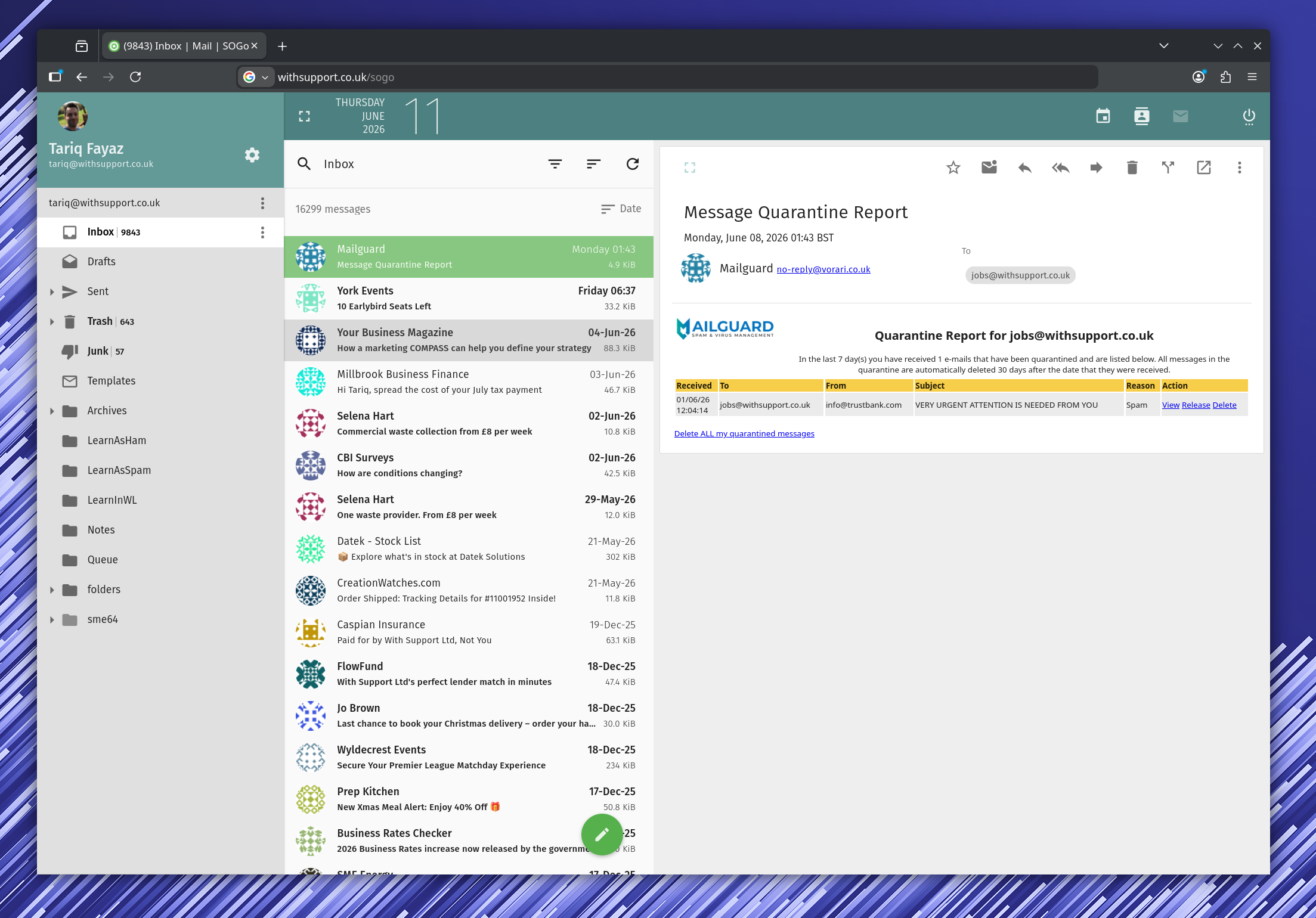
SOGo is an open-source groupware platform designed to provide the same core collaboration features businesses expect from Microsoft Exchange and Microsoft 365.
Users gain access to:
- Shared calendars
- Shared contacts
- Tasks
- Mobile synchronisation
- Webmail access
- Outlook integration
Unlike many alternative groupware platforms, SOGo has been designed from the ground up to scale efficiently and support standard protocols including IMAP, SMTP, CalDAV, CardDAV, LDAP and Microsoft ActiveSync.
The Biggest Benefit: Native ActiveSync Support

One of the most common concerns when replacing Exchange or Microsoft 365 is mobile device support.
The good news is that SOGo includes native Microsoft ActiveSync support.
This means iPhone, iPad and Android users can simply add their account as an Exchange account.
There are no complicated apps to install.
There are no proprietary synchronisation tools.
There are no workarounds.
Users simply enter their email address and password and immediately gain access to:
- Calendars
- Contacts
- Tasks
All synchronised automatically across their devices using the same familiar setup process they've used for years. SOGo's ActiveSync implementation supports synchronisation of emails, contacts, events and tasks across iOS and Android devices.
For organisations managing dozens or hundreds of mobile devices, this dramatically reduces deployment and support overhead.
Outlook Compatibility Without Exchange
Many businesses want to move away from Microsoft 365 licensing but still rely heavily on Microsoft Outlook.
This is another area where SOGo excels.
Users can continue using Outlook while benefiting from synchronised:
- Calendars
- Contacts
- Tasks
without requiring a Microsoft Exchange Server or Microsoft 365 subscription.
This makes SOGo an ideal platform for organisations that want to reduce Microsoft dependency while avoiding disruption for end users. SOGo provides Outlook compatibility and ActiveSync support alongside its web interface and open standards approach.
A Perfect Exchange Upgrade Path
If you are currently running:
- Exchange 2013
- Exchange 2016
- Exchange 2019
- Microsoft 365
SOGo provides an excellent migration path.
Many organisations find themselves paying for Microsoft licensing simply because they need:
- Shared calendars
- Mobile sync
- Outlook compatibility
- Shared contacts
SOGo delivers these capabilities without ongoing per-user licensing costs.
Whether your goal is reducing operational expenditure, simplifying your infrastructure, or regaining control over your data, SOGo offers a compelling alternative.
Built for Scale
One of the reasons we like SOGo is how well it performs as organisations grow.
Many collaboration platforms work well with a few dozen users but begin to struggle once deployments reach hundreds or thousands of mailboxes.
SOGo was specifically designed with scalability in mind and has been deployed successfully in environments supporting thousands of users. Its architecture is intended to scale from small deployments to large enterprise installations while maintaining performance.
For growing organisations, educational institutions, local authorities, and larger businesses, this makes SOGo a reliable long-term platform rather than a temporary solution.
Features
SOGo provides all features required by organisations to satisfy their increasing and demanding user base.


Flexible Deployment Options
Every organisation has different requirements.
That's why we offer SOGo in multiple deployment models:
Fully Hosted SOGo
We manage the infrastructure, backups, monitoring, updates, and maintenance while your users enjoy a reliable email and collaboration platform.
Private Dedicated SOGo Servers
For organisations requiring greater control, we can deploy dedicated SOGo environments tailored to your requirements.
Turnkey Virtual Appliance
Already have VMware, Hyper-V, Proxmox, Nutanix or another virtualisation platform?
We can provide a turnkey SOGo virtual machine ready to deploy into your existing infrastructure.
This allows organisations to retain full control while dramatically reducing implementation time.
Seamless Migration from Existing Platforms
Moving email systems is often the biggest concern for IT teams.
Our migration services ensure a smooth transition from your existing platform.
We can migrate:
- Calendars
- Contacts
- Tasks
- Shared mailboxes
- Historical data
Whether you are moving from Exchange, Microsoft 365, hosted Exchange, or another mail platform, we handle the migration process with minimal disruption to users.
No User Licensing Costs
Perhaps the most attractive feature for many organisations is SOGo's licensing model.
SOGo is fully open source and released under the GPL/LGPL licence. There are no Microsoft-style per-user licensing requirements for the software itself.
As mailbox counts increase, licensing costs for proprietary platforms can quickly become a significant operational expense.
With SOGo, organisations can invest in infrastructure and support rather than continually increasing software subscription costs.
Why We Recommend SOGo
After evaluating numerous Exchange alternatives, SOGo consistently stands out because it delivers the features businesses actually need:
✓ Native Exchange-style mobile synchronisation
✓ Excellent Outlook compatibility
✓ Shared calendars, contacts and tasks
✓ Enterprise scalability
✓ Open-source flexibility
✓ No per-user licensing fees
✓ Easy migration from Exchange and Microsoft 365
✓ Available as hosted, dedicated, or turnkey virtual appliance deployments
For organisations looking to reduce Microsoft licensing costs without sacrificing functionality, SOGo is one of the strongest alternatives available today.
Looking to Move Away from Microsoft 365?
Whether you're running an ageing Exchange server, reviewing Microsoft 365 costs, or planning a new collaboration platform, we can help.
We provide fully managed SOGo hosting, dedicated private deployments, turnkey virtual appliances, and complete migration services.
Contact us today to discuss your requirements and discover how much you could save by moving to SOGo.